If someone searches for your business, your service, or a product you offer on Google, what do they see?
For many businesses, the first thing a potential customer sees isn’t the homepage of the website. It may be a Google Business Profile appearing in Google Search or Google Maps.
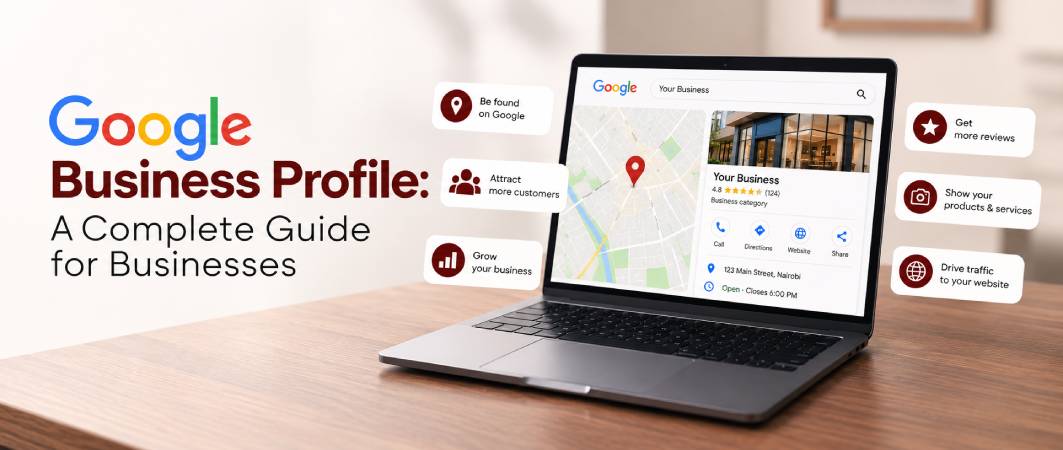
Your profile can show your business name, location, opening hours, website, phone number, photos, reviews, services and other information that helps customers decide whether to contact or visit you.
For businesses that serve customers in person or travel to customers, having an accurate and properly optimized Google Business Profile can be an important part of local search visibility.
This guide explains what Google Business Profile is, who can use it, how to set one up, how to optimize it and how it can support your wider digital marketing strategy.
What Is Google Business Profile?
Google Business Profile is a free Google tool that allows eligible businesses to manage how their business information appears across Google Search and Google Maps.
Depending on the business, customers may be able to see information such as:
- Business name
- Business category
- Address or service area
- Phone number
- Website
- Opening hours
- Services
- Products
- Photos and videos
- Customer reviews
- Booking or other business links
Google says businesses can add or claim a profile at no charge and, after verification, manage their business information on Google.
For example, someone searching for:
“digital marketing agency near me”
or
“plumber in Nairobi”
may see local businesses and their profiles alongside other search results.
This makes Google Business Profile particularly relevant to businesses that depend on local customers.
Why Does Google Business Profile Matter?
Your customers are already using Google to find businesses.
A potential customer might search for:
- Restaurants near me
- Dental clinic near me
- Marketing agency
- Plumber in my area
- Hair salon near me
- Commercial kitchen equipment supplier
- Web design company
- Real estate agency
A complete and accurate Business Profile gives Google useful information about your business and gives potential customers information they can use before contacting you.
Google states that complete and accurate business information can make a business more likely to appear in relevant local searches.
More importantly, your profile can become part of the customer’s decision-making process.
They may see your:
Business → Services → Reviews → Photos → Website → Contact information
before they ever visit your website.
Who Can Use Google Business Profile?
Not every business is eligible.
Google generally requires a business to make in-person contact with customers during its stated hours. This includes businesses with physical locations as well as eligible service-area businesses that travel to customers.
Examples can include:
- Restaurants
- Retail stores
- Salons and beauty businesses
- Clinics
- Professional service businesses
- Contractors
- Home-service businesses
- Agencies with eligible customer-facing locations
- Businesses that travel to customers
Online-only businesses generally aren’t eligible for a Google Business Profile. Google specifically identifies online-only businesses and certain other business types as ineligible.
If your business doesn’t qualify, other Google products, including Google Ads and organic SEO, may still help you reach customers.
How to Create a Google Business Profile
Creating a profile is relatively straightforward.
Step 1: Search for Your Business
Search Google or Google Maps for your business name.
Your business may already have a profile created from information Google has collected from different sources.
If one exists, you may need to claim it rather than creating another profile.
Step 2: Add or Claim Your Business
If your business doesn’t have a profile, Google provides an option to add it.
You can start through Google’s Business Profile process and follow the instructions provided.
Step 3: Enter Accurate Business Information
Provide your real business information, including:
- Business name
- Primary category
- Address or service area
- Phone number
- Website
- Opening hours
- Services
Accuracy matters because Google uses business information to help determine which local searches are relevant to your business.
Step 4: Verify Your Business
Google requires eligible businesses to verify their profiles.
The available verification process can vary, so follow the verification method Google provides for your business.
Once verified, you can manage the information displayed on your profile.
How to Optimize Your Google Business Profile
Creating a profile is only the beginning.
A profile that is technically present but incomplete may not give customers enough information to understand your business.
Here are some of the most important areas to optimize.
1. Use Your Real Business Name
Your business name should represent the name your business actually uses in the real world.
Don’t add keywords or marketing phrases simply to try to improve rankings.
For example, if your company is called:
ABC Digital
don’t change the profile name to:
ABC Digital – Best Digital Marketing Agency in Nairobi
unless that is genuinely your real-world business name.
Google’s guidelines state that business names should accurately represent how the business is known and represented in the real world.
2. Choose the Right Primary Category
Your primary category helps Google understand what your business does.
Choose the category that most accurately represents your core business.
Avoid selecting categories simply because you think they might attract additional searches.
Google recommends choosing the fewest categories necessary to describe the business’s core operation.
3. Complete Your Business Information
Make your profile as complete as possible.
Check that your:
- Address is correct
- Phone number works
- Website is correct
- Opening hours are accurate
- Holiday hours are updated
- Services are properly listed
- Business category is relevant
Google specifically recommends keeping business information complete and up to date.
4. Write a Useful Business Description
Your business description should quickly explain:
- What your business does
- Who you serve
- What products or services you offer
- What makes the business useful to customers
Avoid stuffing keywords into the description.
Google’s guidelines also prohibit using the description primarily for promotions, prices or sales, and links aren’t allowed in the description field.
5. Add High-Quality Photos
Photos help customers understand what your business actually looks like and what you offer.
Depending on your business, you could include:
- Exterior photos
- Interior photos
- Products
- Services
- Team or staff
- Completed projects
- Facilities
- Before-and-after work
- Equipment
- Branded materials
Google recommends adding photos and videos to help customers understand the business.
The goal isn’t simply to upload as many images as possible.
The goal is to provide useful visual information.
6. Add Your Products and Services
If the feature is available for your business category, make use of relevant product and service sections.
For example, a marketing agency might list:
- SEO
- Website Design
- Social Media Management
- Google Ads
- Content Marketing
A restaurant could highlight its major offerings.
A construction company could showcase its key services.
This helps potential customers understand what you actually offer.
7. Keep Your Opening Hours Updated
Few things damage trust faster than inaccurate opening hours.
If customers arrive at your business and discover that you’re closed when Google says you’re open, the experience can affect their perception of the business.
Update:
- Normal opening hours
- Holiday hours
- Temporary closures
- Special operating hours
Google specifically recommends keeping business hours and other business information up to date.
How Google Reviews Affect Your Business
Reviews are one of the most visible elements of a Business Profile.
Potential customers can use reviews to understand other customers’ experiences before making a decision.
Encourage genuine customers to leave honest feedback and respond professionally to reviews.
Google recommends responding to reviews and notes that helpful responses can help a business stand out.
Don’t manufacture reviews or use misleading tactics.
The objective should be to build a genuine reputation based on real customer experiences.
Google Business Profile and Local SEO
Google Business Profile is closely connected to local SEO.
Google explains that local results are primarily influenced by:
- Relevance — how closely a business matches the search
- Distance — how close the business is to the searcher or specified location
- Prominence — how well-known the business is
These factors help Google determine which local businesses are relevant to a particular search.
This means creating a profile does not guarantee that your business will appear first.
Instead, your goal should be to give Google accurate, complete information while building a credible online presence.
Google Business Profile vs SEO: What’s the Difference?
Google Business Profile and SEO work together, but they aren’t the same thing.
Google Business Profile
Primarily helps eligible businesses appear and manage information in Google’s local ecosystem, particularly Search and Maps.
SEO
Involves improving your website and broader online presence so that relevant pages can appear in organic search results.
For example, an accounting firm could use:
Google Business Profile
→ to improve its local presence and provide business information.
SEO
→ to create useful pages targeting searches such as “accounting services for small businesses.”
Content marketing
→ to answer questions potential customers are searching for.
Google Ads
→ to reach people through paid search advertising.
Together, these channels can create a broader search strategy.
How to Get More Customers From Google Maps
If your business depends on local customers, visibility on Google Maps can be valuable.
Start with the fundamentals:
- Claim and verify your profile.
- Use accurate business information.
- Select the correct category.
- Clearly describe your services.
- Add quality photos.
- Keep your hours updated.
- Encourage genuine reviews.
- Respond to customer reviews.
- Keep your website accurate and relevant.
- Maintain consistency across your online presence.
Google also uses information from sources beyond the Business Profile itself, including publicly available information and other sources, when compiling information about businesses and places.
That makes your website and wider online presence important parts of local visibility too.
Can a Service-Area Business Use Google Business Profile?
Yes, eligible service-area businesses can use Google Business Profile.
For example, businesses that travel to customers rather than operating from a customer-facing storefront may qualify.
However, businesses should follow Google’s rules around addresses and service areas rather than using virtual offices or inaccurate locations simply to appear in additional areas.
This is particularly important for businesses operating across multiple cities or regions.
Common Google Business Profile Mistakes
Using Keywords in the Business Name
Don’t add unnecessary keywords to your business name.
Creating Multiple Profiles for One Location
Google’s guidelines generally call for one profile per business location, with specific exceptions for certain departments and practitioners.
Using a Fake or Virtual Address
Your listed location must follow Google’s eligibility and address requirements.
Leaving the Profile Incomplete
Missing information makes it harder for customers to understand what you offer.
Ignoring Reviews
Reviews are part of your public customer experience. Respond professionally and consistently.
Using Low-Quality Photos
Poor-quality or irrelevant images can make the business appear less professional.
Expecting Instant Rankings
A verified profile doesn’t guarantee a particular position in local search.
Local visibility depends on several factors, including relevance, distance and prominence.
Does Google Business Profile Help International Businesses?
This depends on what you mean by “international.”
Google Business Profile is primarily a local-search tool, so it is most useful when your business has eligible physical or service-area operations where customers interact with you in person.
For a business serving customers across different countries, you shouldn’t rely on Google Business Profile alone.
A broader international digital marketing strategy may include:
- International SEO
- Location-specific landing pages
- Content marketing
- Google Ads
- Technical SEO
- Social media
- Digital PR
- Conversion-focused websites
- Local SEO for individual locations
For example, a company operating in Kenya, the UK and the United States may need different SEO and local-search strategies for each market rather than simply creating profiles everywhere.
The important distinction is:
Google Business Profile helps with local visibility. SEO can help you build broader organic visibility.
How Google Business Profile Can Generate Leads
Visibility is only useful when it contributes to business results.
A potential customer might discover your business through Google and then:
Search → Business Profile → Reviews → Website → Contact → Enquiry
Your profile should therefore make the next step obvious.
Depending on your business, that could mean:
- Calling your business
- Visiting your location
- Visiting your website
- Requesting a quote
- Booking an appointment
- Asking about a service
Your website should then continue the journey with clear information and strong calls to action.
Google Business Profile Is Part of a Bigger Strategy
A Business Profile shouldn’t exist in isolation.
Think of your digital presence as a connected system:
Google Business Profile
↓
Google Search & Maps visibility
↓
Website
↓
SEO & Content
↓
Trust & Reviews
↓
Lead Generation
↓
Sales
If your Business Profile looks professional but your website is outdated, customers may still leave.
If your website looks excellent but nobody can find you, you may still struggle to generate traffic.
The strongest approach is to make each part of your digital presence support the others.
Frequently Asked Questions
Yes. Google states that businesses can add or claim a Business Profile at no charge.
It can support local search visibility, but having a profile does not guarantee higher rankings. Google considers multiple factors when determining local results.
The timing can vary. Google notes that new businesses can take time to appear in search results, and changes to business information can also take time to be reflected.
Generally, no. Google says businesses must make in-person contact with customers during their stated hours, subject to specific eligibility rules and exceptions.
Some service-area businesses can qualify even when customers don't visit a storefront. They must still meet Google's eligibility requirements.
Provide a good customer experience and make it easy for genuine customers to leave honest feedback. Respond professionally to the reviews you receive.
No. Reviews are one part of Google's broader local-search system. Local results also depend on factors such as relevance, distance and prominence.
If you have multiple locations, limited internal resources or a broader local SEO strategy, professional management can be useful.
However, the business owner should retain ownership and authorized access should be managed appropriately. Google's guidelines specifically state that agencies and other authorized representatives should have the owner's consent and should work transparently with the business owner.
Google Business Profile is more than a listing on Google Maps.
For eligible businesses, it can be an important part of the customer journey, helping people discover your business, understand what you offer, read reviews, visit your website and ultimately contact you.
But it works best as part of a wider digital marketing strategy.
Your Google Business Profile, website, SEO, content, reviews, social media and paid advertising should work together rather than operate as separate marketing activities.
Want More Customers to Find Your Business Online?
At Osyne, we help businesses build stronger digital visibility through SEO, website design, social media management and paid advertising.
Whether you’re targeting customers in your local market or building an international presence, the goal isn’t simply to get more visibility, it’s to turn that visibility into meaningful enquiries and business growth.
Ready to improve your online presence?